

- Joined
- Dec 31, 2025
- Messages
- 6,290
- Solutions
- 20
- Online time
- 10d 1h
- Reputation
- 8,758
- Location
- Short Ramus
- Guild
- Norwood 2
First Off all this Guide is for beginners!
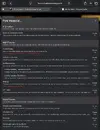
Click on „Forums“

Then click on „New posts“

Now u wanna click on „Post thread…“

After that click on the Forum u want ur thread to be in
(Tip: dont pick „must reads“ an administrator will move Ur thread in there if he thinks its worth it)

Following that u r gonna get Ur title,prefix(optional) and Ur text(or whatever u wanna have in Ur thread) in

Now if u r finished u click on „Post thread“

Now also pls make sure every Post of u is interesting and reasonable!
Also pls make sure u r following the guidlines from.com
Thats abt it! Now I am going to Tag members I Like personaly:
@Auggy
@Night
@cckstacy
@Molotongo
@jony🖤bp
@Currycelloser
@Damian Kater
@Dean
@Grilldaddy❤️
ofc there r more members I like
Click on „Forums“
Then click on „New posts“
Now u wanna click on „Post thread…“
After that click on the Forum u want ur thread to be in
(Tip: dont pick „must reads“ an administrator will move Ur thread in there if he thinks its worth it)
Following that u r gonna get Ur title,prefix(optional) and Ur text(or whatever u wanna have in Ur thread) in
Now if u r finished u click on „Post thread“
Now also pls make sure every Post of u is interesting and reasonable!
Also pls make sure u r following the guidlines from.com
Thats abt it! Now I am going to Tag members I Like personaly:
@Auggy
@Night
@cckstacy
@Molotongo
@jony🖤bp
@Currycelloser
@Damian Kater
@Dean
@Grilldaddy❤️
ofc there r more members I like
Attachments
Last edited:


